Structured input first
The generator starts with guided fields and controlled inputs. That keeps the technical XML layer traceable without asking business users to work inside raw XML.
GIR XML generator
Use GIR.WTF as a Pillar 2 GIR XML generator for structured inputs. It maps user-controlled GIR information into a technical XML workflow so finance and tax teams do not need to edit tags manually.
GIR.WTF handles the technical layer. The user and their advisers remain responsible for the underlying tax and legal positions, the reporting information and the final filing decisions.

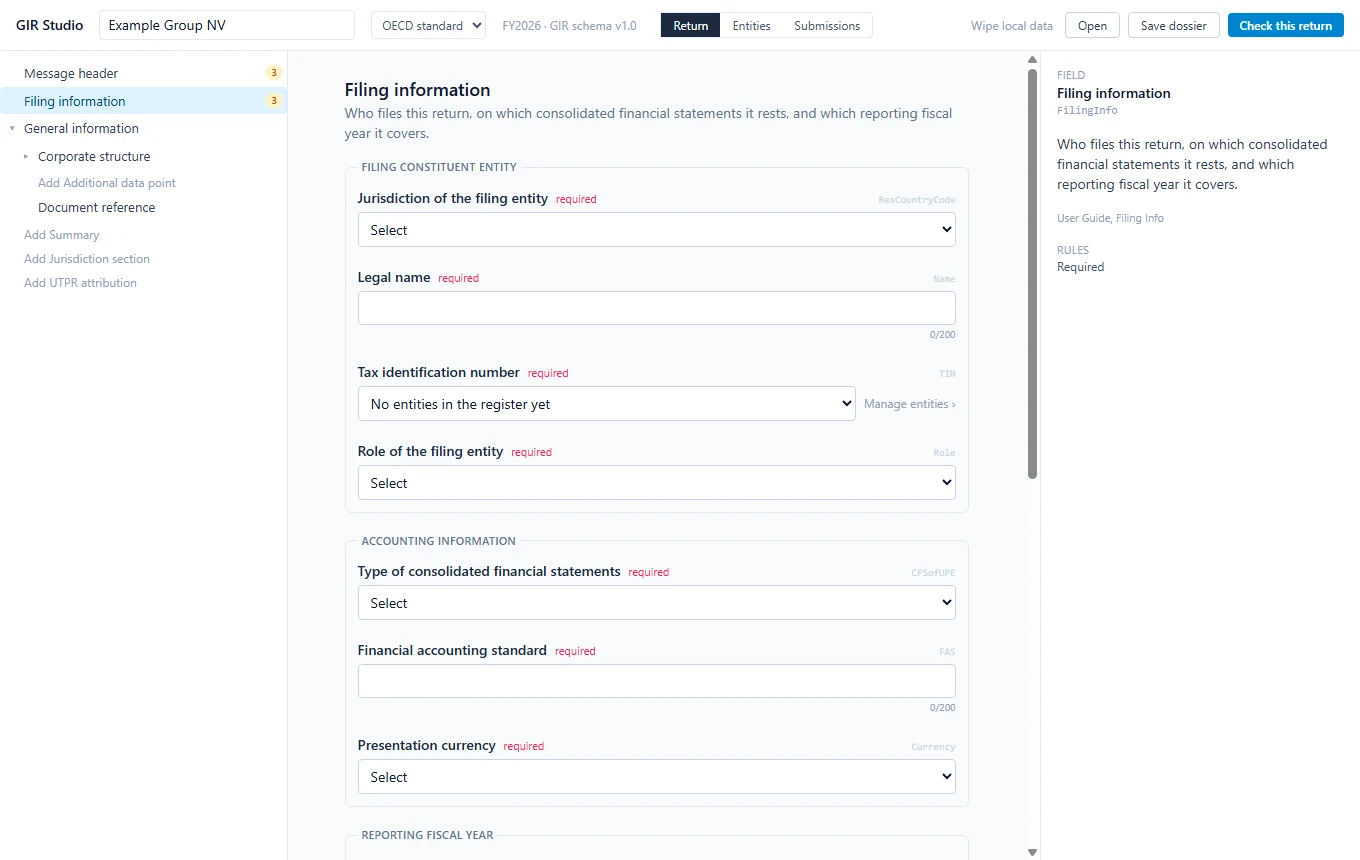
Generator demo
The product does not ask users to write XML. It captures controlled GIR fields and maps them into a technical XML structure that can be validated before export.
<GIR>
  <ReportingPeriod>
    <StartDate>2024-01-01</StartDate>
    <EndDate>2024-12-31</EndDate>
  </ReportingPeriod>
  <Jurisdiction>BE</Jurisdiction>
</GIR>
What GIR.WTF does
GIR.WTF combines guided GIR XML generation, browser-based technical validation, schema mapping, Belgian technical checks and XML export in one focused product workflow.
The generator starts with guided fields and controlled inputs. That keeps the technical XML layer traceable without asking business users to work inside raw XML.
GIR.WTF maps reporting-period, entity, jurisdiction and return information into the supported GIR XML structure before export.
The generator does not determine whether a value is fiscally correct. It prepares the technical file from the information the user provides and controls.
Official sources
GIR.WTF is implementation software. OECD and FPS Finance remain the authoritative sources for the GIR XML schema, Belgian materials and official filing context.

Practical questions
Each focused GIR XML page starts from a concrete implementation problem: generating XML, validating structure, mapping the OECD schema, preparing Belgian context or reviewing validation-error behaviour.
The generator route is for teams that already know the GIR inputs they want to prepare and need a guided XML workflow instead of manual tag editing.
Finance and tax users can review structured inputs first, while technical reviewers keep access to the XML shape and validation output.
Generated XML should be checked before export, so this page links the generation task back to validation and schema readiness.
Continue to the related workflowImplementation evidence
The public pages show the same boundary as the product: official sources define the schema and Belgian filing context; GIR.WTF provides the technical workflow around structured input, validation messages and export preparation.
The hub, generator, validator, schema, Belgium and validation-error pages each connect practical implementation questions with source-linked context and clear next workflow steps.
Teams preparing 2026 GIR XML work should verify the current OECD schema and user-guide source first. GIR.WTF adds a guided implementation layer around mapping, validation and export.
FPS Finance forms, tools, XSD and validation-rule materials are linked as official sources. GIR.WTF keeps Belgian implementation checks separate from tax advice or filing guarantees.
The browser demo exposes missing technical fields, malformed XML, unsupported document shape and format issues without sending pasted XML to the server.
Generator, validator, schema, Belgian validation rules, GIRNOT Belgium and MyMinfin notification preparation all resolve into the central GIR XML workflow.
GIR XML workflow
The GIR XML hub connects the practical implementation paths: generation, validation, schema readiness, Belgian technical context, GIRNOT, MyMinfin and validation-error detail.
Related implementation questions
These pages cover the common entry points for teams looking for GIR XML validation errors, OECD schema implementation, Belgian validation rules, GIRNOT and MyMinfin notification preparation.
GIRGIR means GloBE Information Return in Pillar Two. gir.wtf explains the Belgian GIR, GIRNOT, MyMinfin and GIR XML workflow for XML-ready review output. No tax or legal advice.
Belgian GIR validation rulesBelgian GIR validation rules page for Pillar Two teams preparing GloBE Information Return XML, GIR XSD checks, data gaps and reviewer-friendly validation output. No tax or legal advice.
GIRNOT BelgiumGIRNOT Belgium portal intake for the notification of the GIR filing entity: MyMinfin preparation, filing entity data checks and GIR/GIRNOT validation support. No tax or legal advice.
Pillar 2 GIR BelgiumPillar 2 GIR Belgium portal workflow for Belgian groups preparing GloBE Information Return data, GIRNOT scope, MyMinfin context and OECD GIR/XML validation. No tax or legal advice.
OECD GIR XML schemaOECD GIR XML schema 2026 readiness for Pillar Two teams: guided GIR data capture, XSD validation checks, XML export preparation and data gap review. No tax or legal advice.
MyMinfin GIR notificationMyMinfin GIR notification preparation for Belgian Pillar 2 teams: GIRNOT intake, filing entity data checks, XML-readiness and public-form boundaries. No tax or legal advice.
NederlandsGIR Belgie workflow voor Belgische Pijler 2-teams.
FrancaisWorkflow GIR Belgique pour les equipes Pilier 2.
FAQ
Yes. GIR.WTF is positioned as a technical Pillar 2 GIR XML generator for structured user-controlled inputs, with validation before export.
Yes. The product direction is structured form input that is mapped into GIR XML, with validation before export.
No. Generation creates technical output. Professional review, authority submission and filing responsibility remain outside the public product claim.
Portal access
Request access to the GIR portal. The first step is technical GIR/GIRNOT scope, data-gap and XML-readiness intake without submitting confidential production data through the public form.